Guest review links

Client feedback without the sign-up wall

Send one link. Your clients open it in their browser, click the element they want to talk about, and leave a comment. No account, no extension, nothing to install.

  • No account for reviewers
  • Password protection
  • Regenerate any time
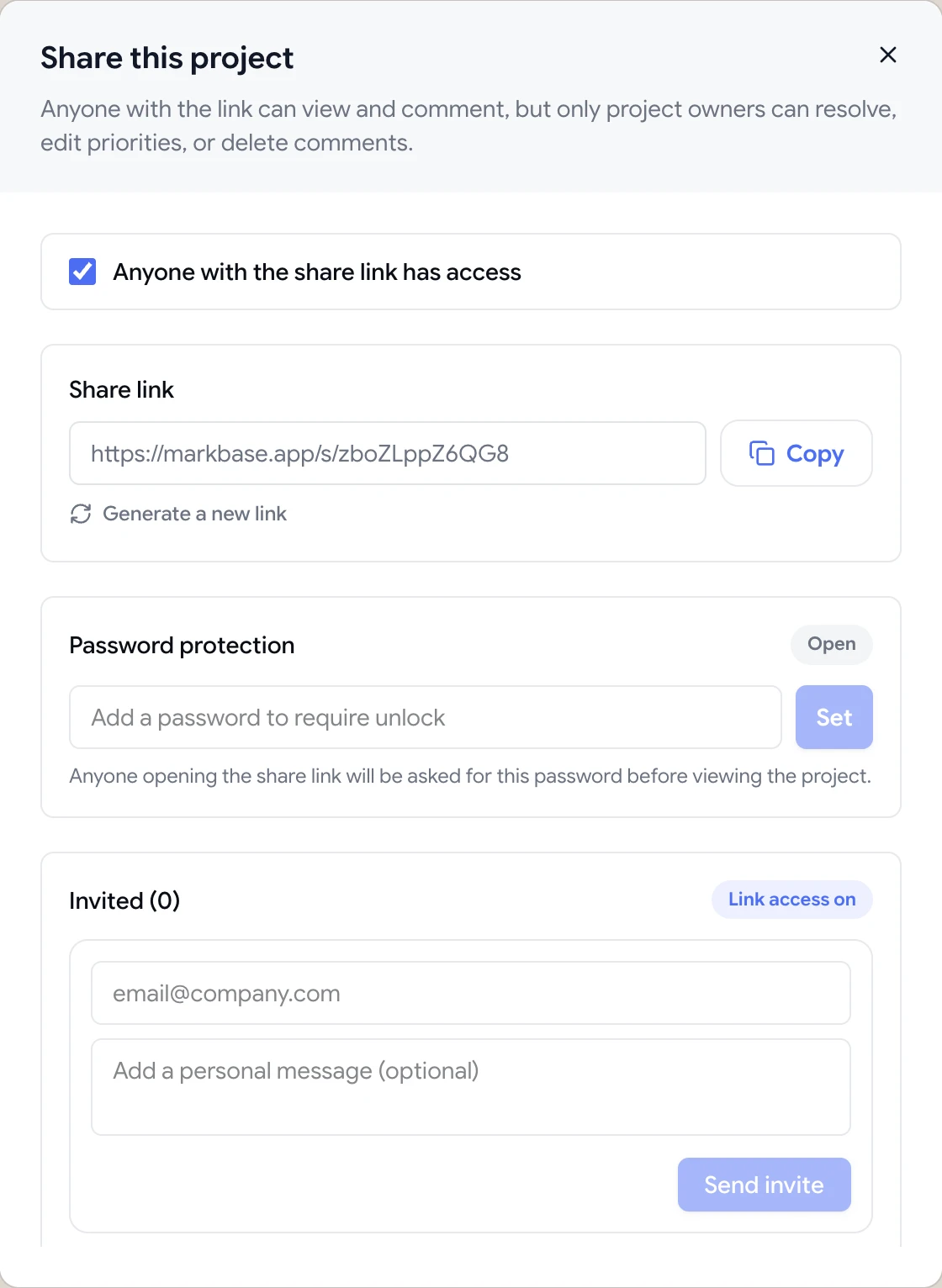
Share dialog with the guest review link, password protection and email invites
The problem

Every extra step between a client and a comment costs you a review round

  • Clients ignore the invite because they don't want another account.
  • Feedback arrives as a screenshot in an email with an arrow drawn in Paint.
  • Someone installs a browser extension, then can't find the button to use it.
  • Old review links keep working long after the project has moved on.
Highlights

Sharing that works for the people giving feedback

Guests get the same pinned-comment experience as your team, with the access controls you'd expect.

No account required

Anyone with the link can view the project and comment as a guest, straight from their browser.

Password protection

Add a password so only the people you've told can open the review, even if the link is forwarded.

Turn off or regenerate

Switch link access off when a review is done, or generate a new link so the old one stops working.

Invite by email

Send the review to specific people with a personal message, straight from the Share dialog.

Your team stays in control

Guests can comment, but only workspace members can resolve comments, change priority or delete feedback.

Client access by folder

For ongoing clients, give them a client role that only shows the folders you've shared with them.

One link, the exact element, a clear comment

A guest review link opens your project in ClientTweak with the comment layer ready. Reviewers switch to Comment mode, click the button, heading or image they mean, and type. The pin attaches to that element, so there's no guessing which “top section” they were talking about.

Each comment can save a screenshot of what the reviewer was looking at, along with their viewport size and scroll position. When you open the comment later, you see the page the way they saw it.

  • Works in any modern desktop browser
  • Nothing to install on the reviewer's machine or your website
  • Comments appear in your project instantly, numbered and threaded

ClientTweak review screen: a client's homepage with numbered comment pins and the comment list beside it

Access controls that match how projects really end

Review links shouldn't live forever. From the Share dialog you can add a password, turn link access off, or generate a new link. Regenerating invalidates the old URL straight away, which is useful when a link has been forwarded further than you intended.

If you need to know exactly who is reviewing, invite people by email instead of sharing the open link. And when a review round is over, use Finish review or pause comments so feedback stops arriving while your team works through it.

  • Password-protect any share link
  • Disable link access without deleting the project
  • Regenerate the link to cut off old copies
  • Pause comments while you work through a round
Share dialog with the guest review link, password protection and email invites

Guests comment, your team decides

Guests can leave comments and replies, but the workflow stays with your team. Only workspace members can resolve a comment, set its priority or delete it, so a client can't accidentally close an issue you still need to fix.

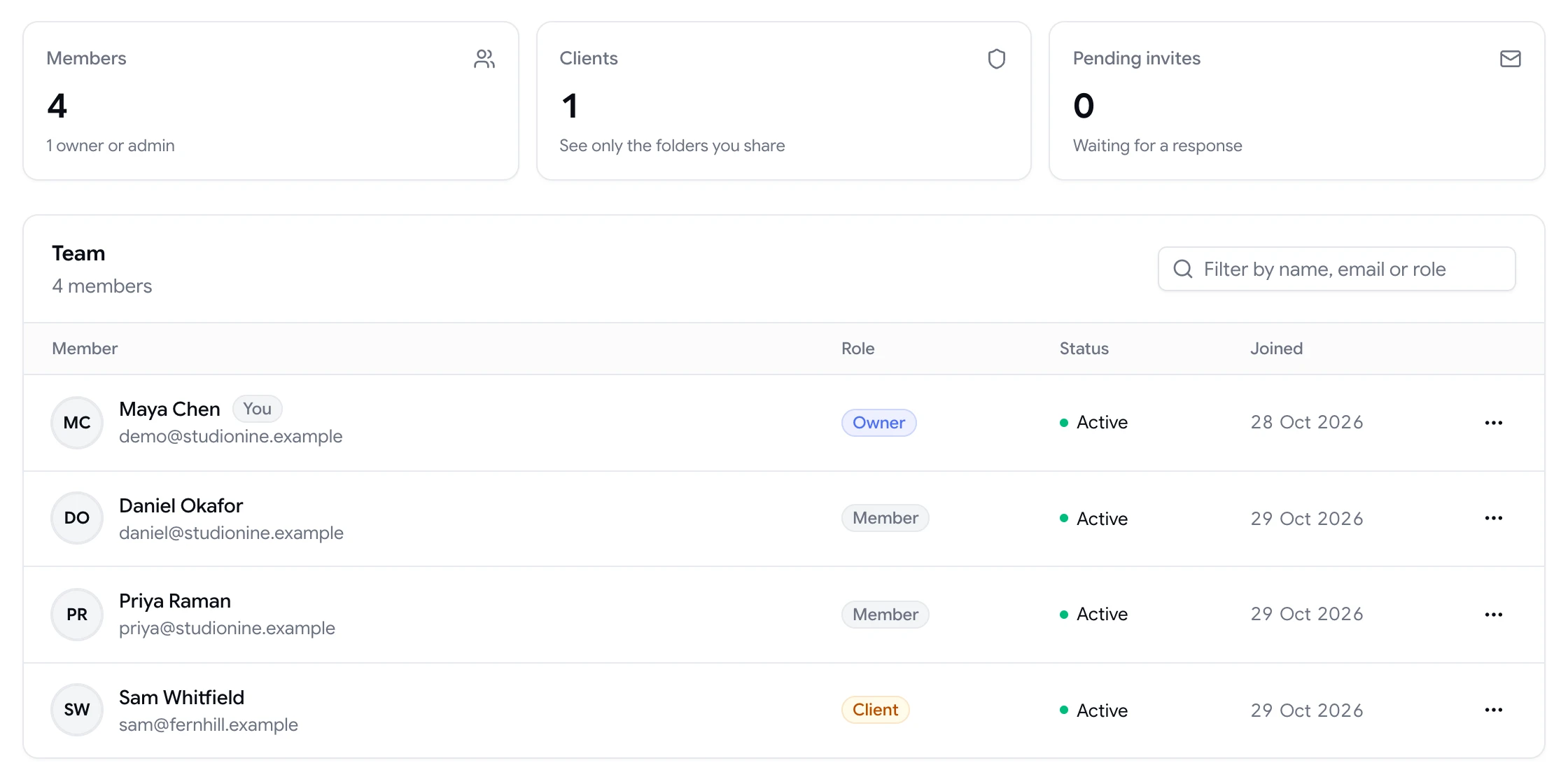
For long-running client relationships, add the client to your workspace with the client role instead. They'll sign in, see only the folders you've shared with them, and never see your other clients, billing or settings.

  • Resolve, prioritise and assign stay with your team
  • Client role limits access to shared folders
  • Unlimited guest reviewers on every plan
Team page showing workspace members and a client with their roles
How it works

Share a review in under a minute

  1. 1

    Add your project

    Paste a live or staging URL, or upload a PDF or image.

  2. 2

    Open Share

    Copy the link, or invite reviewers by email with a short message.

  3. 3

    Set access

    Add a password if the work is confidential. Turn the link off any time.

  4. 4

    Collect pinned comments

    Feedback lands in your project, attached to the exact element.

FAQ

Frequently asked questions

Do reviewers need a ClientTweak account to leave feedback?

No. Anyone with the share link can view the project and comment as a guest from their browser. Teammates you invite to your workspace get full accounts with mentions and notifications.

Do reviewers need to install a browser extension?

No. The review opens in a normal browser tab with the comment layer already in place. Nothing is installed on the reviewer's computer or on your website.

Can I stop a share link from working?

Yes. You can turn link access off from the Share dialog, or regenerate the link so the old URL stops working while you send a new one.

Can I password-protect a review link?

Yes. Add a password in the Share dialog and anyone opening the link is asked for it before they can see the project.

Can guests resolve or delete comments?

No. Guests can comment and reply. Resolving, changing priority and deleting comments are limited to members of your workspace.

Is there a limit on how many people can review?

No. Every plan includes unlimited guest reviewers, and unlimited workspace members.

Get started

Send your next review as a link.

Your clients click, comment and get back to their day. You get feedback pinned to the exact element.

  • Unlimited guest reviewers
  • Nothing to install
  • One flat price