Marker.io alternative

The Marker.io alternative for client reviews

Marker.io is built for bug reporting, with a widget, a browser extension, console logs and session replay on higher plans. ClientTweak is built for reviewing websites with clients: no widget, no extension, one flat price.

ClientTweak

vs
M

Marker.io

The short answer

ClientTweak or Marker.io?

Choose ClientTweak if…

  • Most of your feedback comes from clients and stakeholders, not testers.
  • You don't want to add a widget to the site or ask anyone to install an extension.
  • You want unlimited team members at a flat price.
  • You also review PDFs and images.

Choose Marker.io if…

  • You need console logs, network requests or session replay with each report.
  • You want browser, OS and screen size on every report.
  • You report bugs into GitHub, GitLab, Linear, Notion or Azure DevOps.
  • You want website monitoring alongside feedback.
Side by side

ClientTweak vs Marker.io

FeatureClientTweakMarker.io
Pricing modelFlat plans, not per seat: $12.99/month, $89.99/year or $249.99 one-time (lifetime). Every plan includes every feature.Plans with included members: Starter $59/month (3 members), Team $199/month (15), Agency $129/month (15); lower when billed annually. Extra members are charged per seat.
Team membersUnlimited workspace members and unlimited guest reviewers on every plan.Set by plan, plus paid extra members. Guests and reporters are unlimited and free.
Free optionFree trial. No free plan.15-day free trial, no credit card required. No free plan listed.
Getting startedNothing to install. Paste a URL and ClientTweak loads the site through a proxy with a comment layer on top. No script, no browser extension.Embed a widget on your site, or use the browser extension.
What you can reviewLive and staging websites, PDFs and images (PNG, JPEG, WebP, GIF).Websites and web apps.
Technical captureA screenshot of what the reviewer was looking at, plus viewport size and scroll position. Pins anchor to the page element.Browser, OS, screen size and URL on all plans; console logs, network requests and session replay on Team and above.
Client & guest accessGuests comment from a share link without an account. Optional client role that only sees the folders you share.Guests and reporters report through the widget.
IntegrationsJira, Asana, ClickUp and Trello (tasks from comment events), Loom recordings in comments. Slack is coming soon.Trello, Asana, ClickUp, GitHub, GitLab, Linear and Notion; Jira on Team and above; Azure DevOps, Zendesk and Intercom on Business.
Device previewsDesktop, tablet and phone preview widths inside the review.Reports are made on the real device and browser in use.
ExtrasPDF and image review, client role, lifetime plan.Website monitoring with scheduled page scans; audit trail.

Marker.io details are based on its public website, checked in October 2026. Products change — check marker.io/pricing for the latest.

Different jobs: bug reporting versus client review

Marker.io is designed for teams that want detailed bug reports: the widget collects environment details, and higher plans add console logs, network requests and session replay. That's valuable for QA and engineering teams debugging tricky issues.

ClientTweak is designed for reviews: getting clients, designers and stakeholders to tell you clearly what should change. Reviewers open a link, click the element and comment. You see a screenshot of what they saw and their viewport size, then send the work to your task tool.


A comment thread with replies, pinned to a button on the page

No widget to install or remove

A widget needs to be added to every site you review and removed or hidden before launch. ClientTweak loads the site through a proxy instead, so you can review a client's live site without touching its code, and nothing needs cleaning up afterwards.

ClientTweak review screen: a client's homepage with numbered comment pins and the comment list beside it

Flat pricing for agencies

Marker.io plans include a set number of members, with more charged per seat. ClientTweak includes unlimited members and guests on every plan, from $12.99 a month to a $249.99 lifetime plan.

  • Unlimited members
  • Unlimited guest reviewers
  • Every feature on every plan
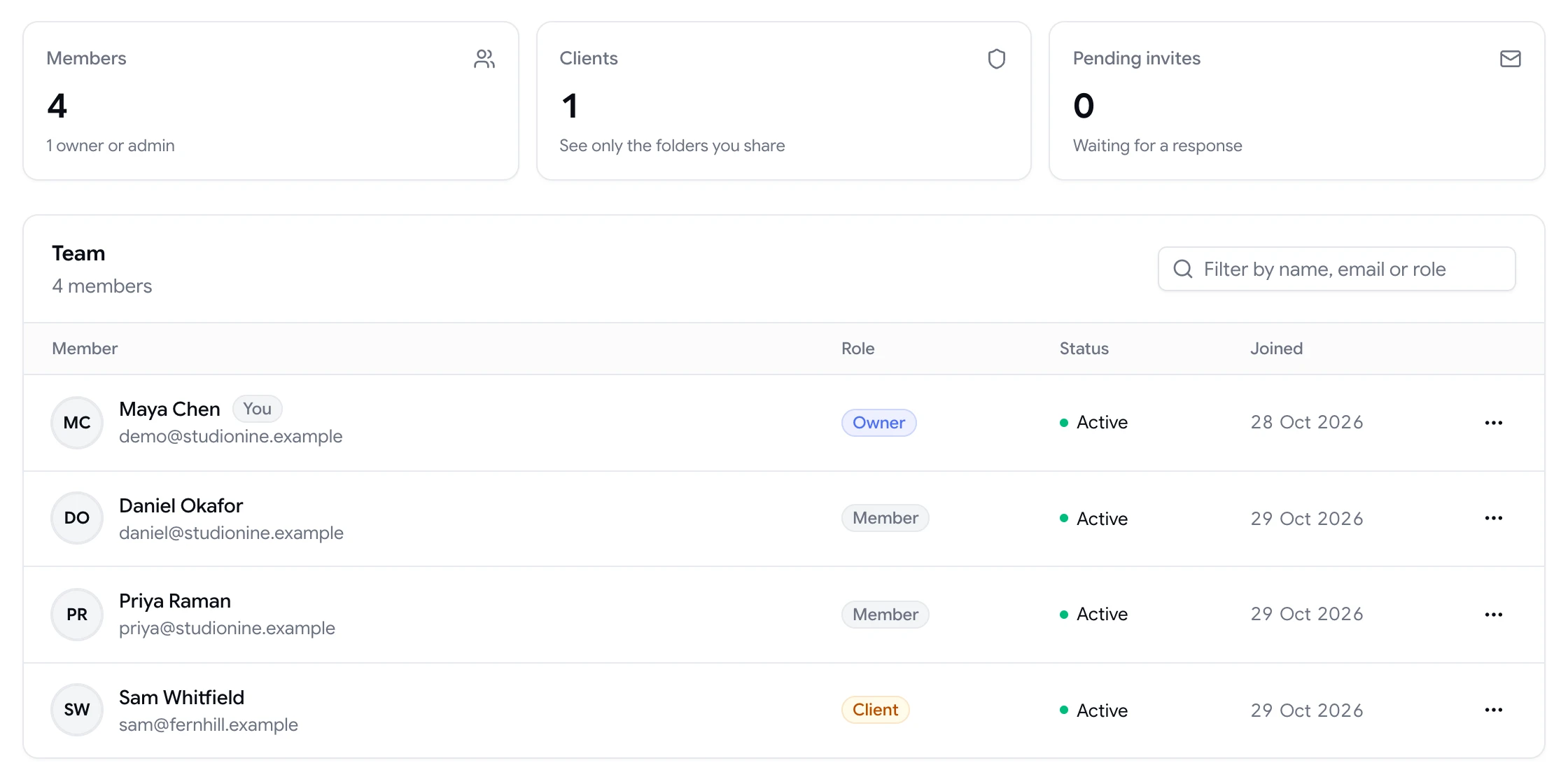
Team page showing workspace members and a client with their roles

Responsive and document review in the same place

Agency projects aren't only web pages. ClientTweak handles the PDFs and images around a site build, such as proposals, wireframes and exported mockups, in the same workspace. Upload a new version when the design changes and keep the history.

For the site itself, preview desktop, tablet and phone widths and keep comments scoped to the width they were left on.

  • PDF and image projects
  • Version history for uploads
  • Desktop, tablet and phone previews
Phone-width preview of a website inside ClientTweak
Switching

Moving from Marker.io to ClientTweak

  1. 1

    Start a trial

    Create a ClientTweak workspace and invite your team. Members are unlimited on every plan, so invite everyone who reviews.

  2. 2

    Add your next project

    Paste the live or staging URL, or upload the PDF or image you're reviewing. There's no script to add to the site.

  3. 3

    Connect your task tool

    Link Jira, Asana, ClickUp or Trello from the Integrations page so new comments turn into tasks where your team already works.

  4. 4

    Send the review link

    Share the project link with clients. They click, comment and you get feedback pinned to the exact element. Run both tools side by side until you're sure.

FAQ

ClientTweak vs Marker.io: common questions

What is the best Marker.io alternative?

If your feedback mostly comes from clients reviewing websites, ClientTweak is a simpler, lower-cost alternative. If you rely on console logs and session replay for debugging, Marker.io remains a strong choice.

Is Marker.io free?

Marker.io's pricing page lists a 15-day free trial and no free plan. ClientTweak also offers a free trial.

Does ClientTweak need a widget or extension?

No. ClientTweak loads your site through a proxy with a comment layer on top. There's nothing to install on the site or in the browser.

Does ClientTweak capture console logs or session replays?

No. ClientTweak captures a screenshot of what the reviewer saw plus viewport size and scroll position. For console logs and replays, a developer-focused tool like Marker.io is a better fit.

Can ClientTweak send bugs to Jira?

Yes. Connect Jira Cloud and ClientTweak creates issues in the project you choose, including the page URL, a screenshot link and a link back to the comment.

Does ClientTweak support GitHub or Linear?

Not currently. ClientTweak integrates with Jira, Asana, ClickUp, Trello and Loom.

How much does ClientTweak cost?

$12.99 a month, $89.99 a year, or $249.99 once for lifetime access, with unlimited members and guests.

Can I review staging sites with ClientTweak?

Yes, if the staging site is reachable at a public URL. ClientTweak can't review pages behind a login form or HTTP authentication.

Do ClientTweak reviewers need an account?

No. Guests comment from the share link without an account.

Get started

Try ClientTweak alongside Marker.io.

Run your next review round in ClientTweak and compare for yourself. Every plan includes every feature.

  • Unlimited guest reviewers
  • Nothing to install
  • One flat price