Staging site review

Get feedback on staging before it reaches production

Staging is where feedback is cheapest to act on. ClientTweak lets your team and your clients review any staging or preview URL, with nothing to install on the site and nothing for reviewers to set up.

  • No script on your site
  • Private review links
  • Every breakpoint
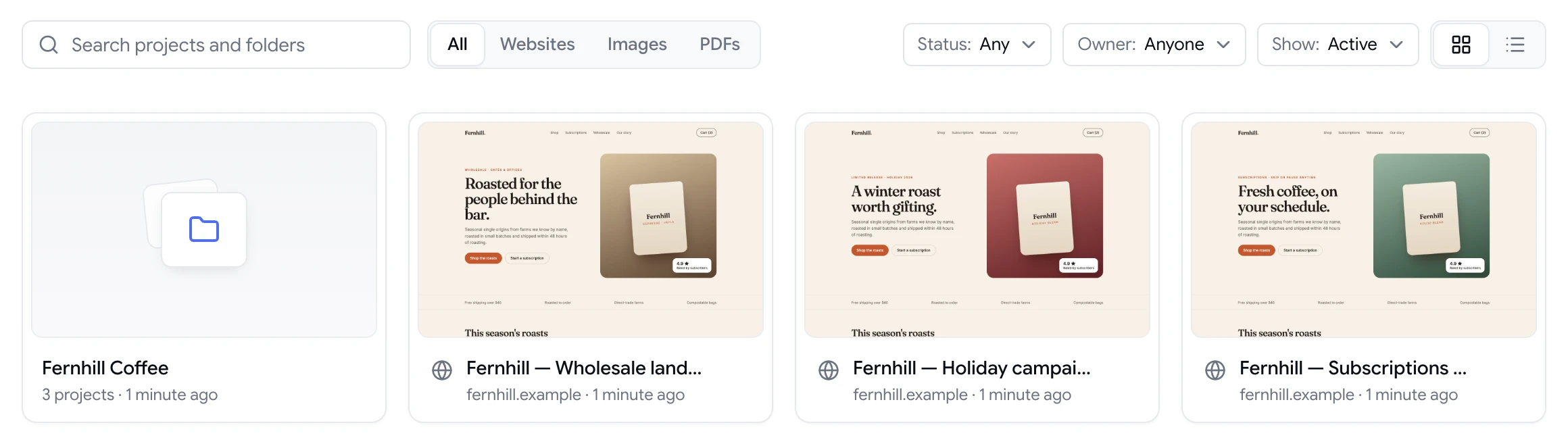
ClientTweak dashboard with a client folder and website project previews
The problem

Staging reviews often happen too late, or not at all

  • Adding a feedback widget to staging means another deploy and another script.
  • Clients can't find the staging URL, or end up on production.
  • Feedback refers to a build that has since changed.
  • Preview links get forwarded around with no way to revoke them.
  • Issues are found in production that were visible on staging for weeks.
Highlights

Review any build your team can share

Nothing to install

ClientTweak loads the site through a proxy. No script, plugin or deploy.

Private links

Password-protect the review link, and turn it off when you're done.

Element-anchored

Pins attach to elements, so they stay put as the build changes.

Every width

Review desktop, tablet and phone layouts.

Browse the build

Click through pages and menus in Browse mode before you comment.

Straight to the backlog

Send issues to Jira, Asana, ClickUp or Trello.

Any staging URL, nothing to deploy

Paste the staging or preview URL into a new project. ClientTweak loads it through a reverse proxy and adds the comment layer on top, so you don't add a widget, change your build or install anything on the server.

ClientTweak needs to reach the site by URL, so public staging environments and tunnels that expose a local site on a public address work well. Pages behind a login form or HTTP authentication aren't supported.

  • No script or plugin
  • Works with any stack or CMS
  • Public staging URLs and tunnels
ClientTweak review screen: a client's homepage with numbered comment pins and the comment list beside it

Keep staging private

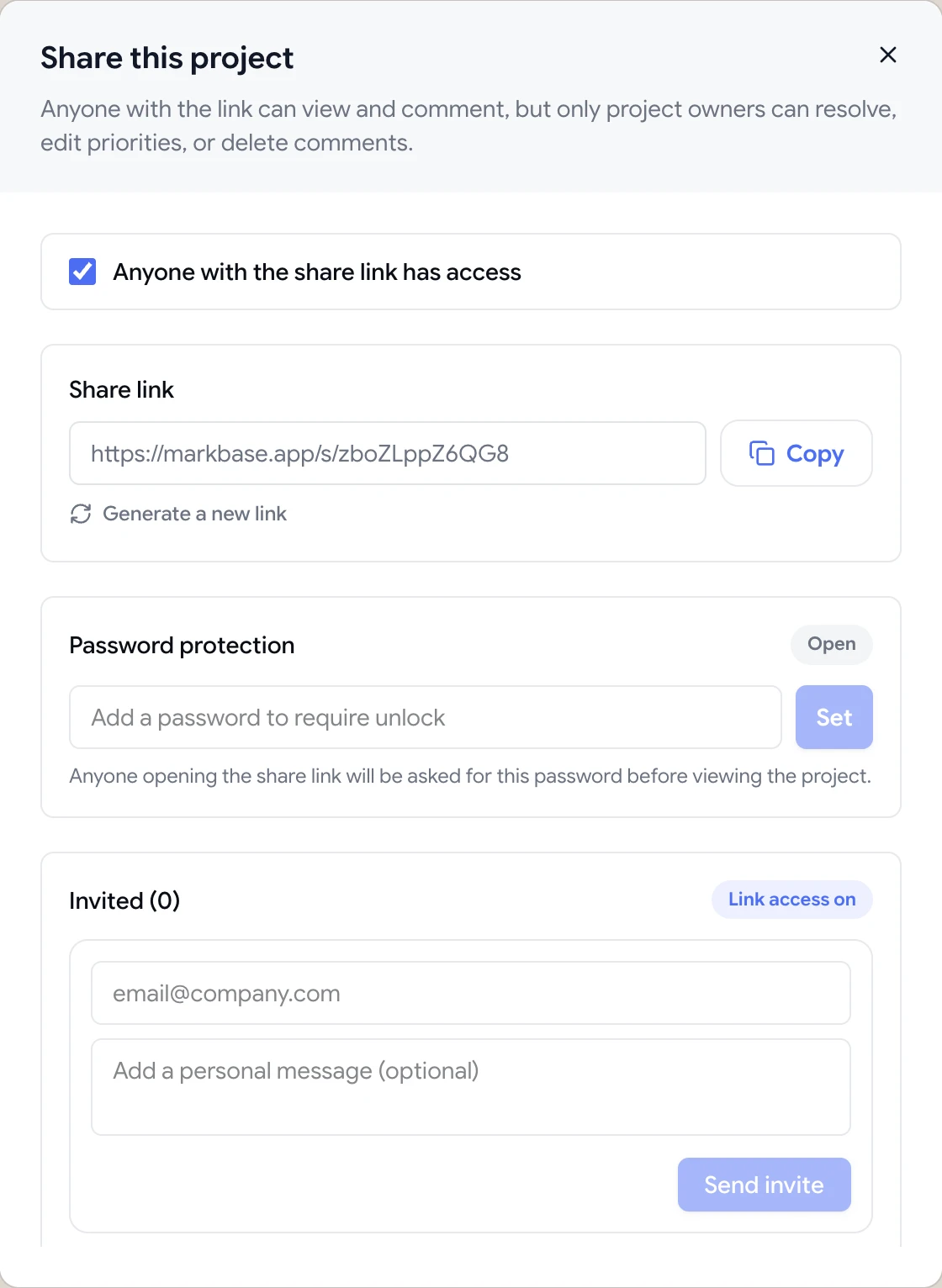
Staging builds often contain unreleased work. Add a password to the review link, invite reviewers by email, and turn link access off or regenerate the link when the review is over.

Share dialog with the guest review link, password protection and email invites

Feedback that survives the next deploy

Staging changes constantly. Because pins anchor to the element rather than a screen position, comments stay attached to the right thing as you deploy fixes. Each comment also saves a screenshot of what the reviewer saw, so you can compare before and after.

A comment thread with replies, pinned to a button on the page

When to review staging, and who should do it

Review staging at milestones rather than only at the end: when a template is first built, when real content is added, and before each release. Early reviews catch structural problems while they're cheap to change; later reviews focus on content and polish.

Bring the right people in at each stage. Designers check the build against the design, content owners read the copy in place, and clients or stakeholders review once the page is close to final. Each group can use the same project, and their comments are kept together on the page.

Because staging changes constantly, resolve comments as fixes are deployed. Reviewers can then look at the resolved list to confirm their feedback was handled.

  • Review at milestones
  • Designers, content owners, then clients
  • Resolve as fixes deploy
How it works

Review a staging site

  1. 1

    Paste the URL

    Create a website project from the staging address.

  2. 2

    Secure the link

    Add a password before sharing.

  3. 3

    Collect feedback

    Team and clients pin comments on the build.

  4. 4

    Deploy and resolve

    Ship fixes to staging and resolve comments.

FAQ

Frequently asked questions

How do I get client feedback on a staging site?

Share a review link to the staging site where the client can comment on the page directly. With ClientTweak there's nothing to install on staging and nothing for the client to set up.

Do I need to add a script to my staging site?

No. ClientTweak loads the site through a proxy and adds the comment layer itself.

Can I review a site behind a password?

Pages behind a login form or HTTP authentication aren't supported. The staging site needs to be reachable by URL.

Can I review localhost?

Not directly. Expose the local site on a public URL with a tunnelling tool, then add that URL to ClientTweak.

Will comments break when the build changes?

Pins anchor to the element using its selector, so they stay attached as long as the element is still on the page.

Can several people review the same staging site at once?

Yes. Everyone with access can comment on the same project, and comments from everyone appear in one list.

Do reviewers need access to our staging server?

No. Reviewers open the ClientTweak review link; ClientTweak fetches the staging site for them. They never need the staging URL itself.

Can we turn off access after the review?

Yes. Turn off the share link or regenerate it from the Share dialog.

Get started

Start your next review today.

Pin feedback on live websites, PDFs and images, and turn it into work your team can track.

  • Unlimited guest reviewers
  • Nothing to install
  • One flat price