Pastel alternative

The Pastel alternative without canvas limits

Pastel and ClientTweak both overlay comments on a live site with no extension needed. The difference is in the plans: Pastel limits active canvases and users on its lower tiers, while every ClientTweak plan includes unlimited projects, members and guests.

ClientTweak

vs
P

Pastel

The short answer

ClientTweak or Pastel?

Choose ClientTweak if…

  • You need more than a handful of active projects without moving to a team plan.
  • You want unlimited members at a flat price.
  • You also review PDFs and images.
  • You prefer a one-time lifetime plan.

Choose Pastel if…

  • You only need one active review at a time and want a free plan.
  • You want CSV export, comment labels or approvals.
  • You need Monday.com, Zapier or webhook export.
  • You need enterprise features such as SAML SSO.
Side by side

ClientTweak vs Pastel

FeatureClientTweakPastel
Pricing modelFlat plans, not per seat: $12.99/month, $89.99/year or $249.99 one-time (lifetime). Every plan includes every feature.Free (1 user, 1 active canvas); Pro $35/month (2 users, 3 active canvases); Team $119/month for 5 users plus $24 per extra user; lower when billed annually.
Team membersUnlimited workspace members and unlimited guest reviewers on every plan.Set by plan. Reviewers, comments and views are unlimited.
Free optionFree trial. No free plan.Free Forever plan, plus a 14-day free trial of paid plans with no credit card.
Active projectsUnlimited projects, organised in folders.1 active canvas on Free, 3 on Pro, unlimited on Team.
Getting startedNothing to install. Paste a URL and ClientTweak loads the site through a proxy with a comment layer on top. No script, no browser extension.Paste a URL; comments are layered on the live site with a proxy, no extensions.
What you can reviewLive and staging websites, PDFs and images (PNG, JPEG, WebP, GIF).Live websites; its plans page also mentions sites, slides and screenshots.
Client & guest accessGuests comment from a share link without an account. Optional client role that only sees the folders you share.Anyone can view and comment without an account.
Device previewsDesktop, tablet and phone preview widths inside the review.Responsive tester for mobile, tablet and desktop.
IntegrationsJira, Asana, ClickUp and Trello (tasks from comment events), Loom recordings in comments. Slack is coming soon.Trello, Asana, Jira, ClickUp, Monday, Zapier and webhook export on Team.
WorkflowThreaded replies, @mentions, assignees, low/medium/high priority, open/resolved status, pause comments, Finish review.Attachments, assigning comments, labels, approvals and CSV export.

Pastel details are based on its public website, checked in October 2026. Products change — check usepastel.com/plans for the latest.

Run every review at once

Pastel's free and Pro plans limit how many canvases can be active at the same time, so you archive one review to start another. On Team, canvases are unlimited, priced for five users with extra users on top.

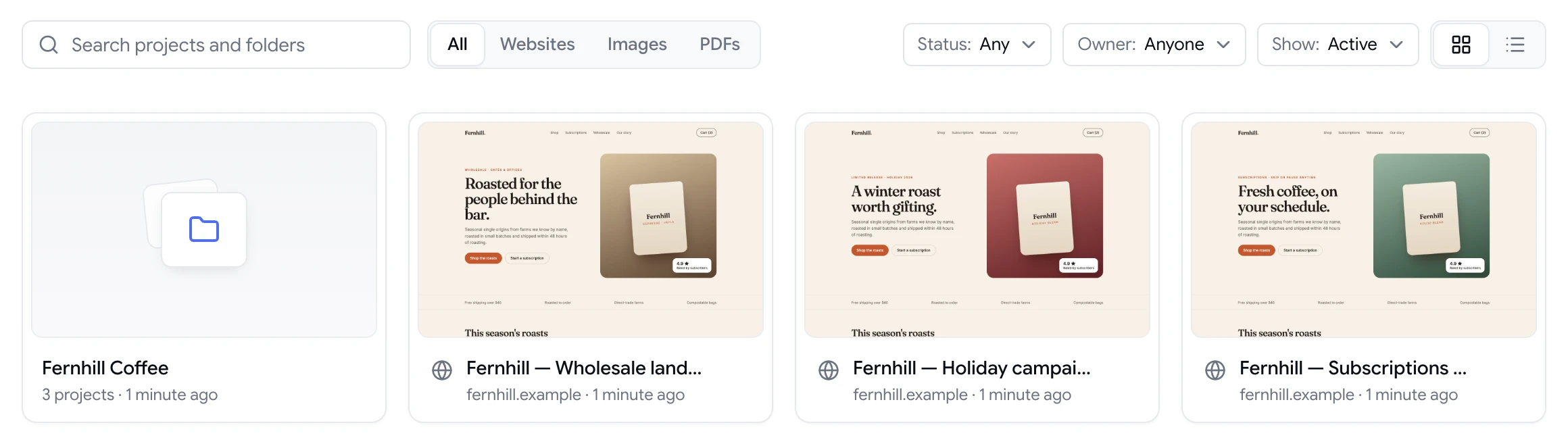
Every ClientTweak plan includes unlimited projects. Keep each client's sites, PDFs and images in their own folders, archive projects when they're done, and never think about slots.

ClientTweak dashboard with a client folder and website project previews

Integrations on every plan

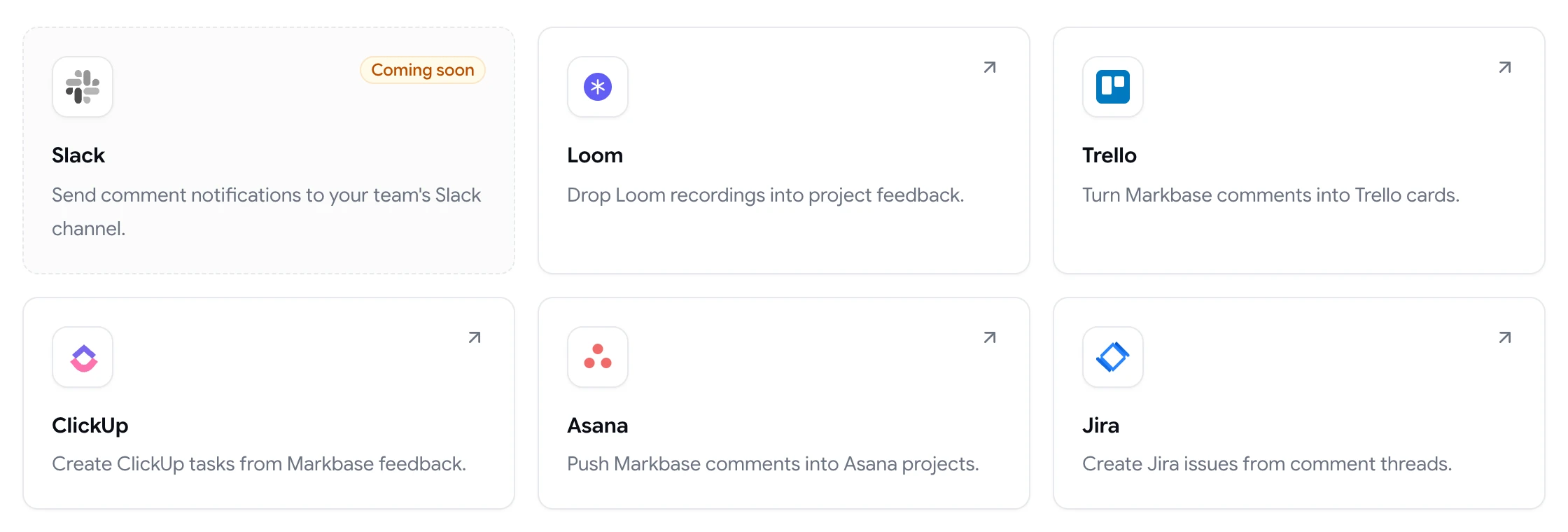
Pastel's project management integrations are on its Team plan. In ClientTweak, Jira, Asana, ClickUp, Trello and Loom are included on every plan, including the $12.99 monthly plan.

ClientTweak integrations page listing Loom, Trello, ClickUp, Asana and Jira, with Slack coming soon

Same lightweight setup

Like Pastel, ClientTweak needs no extension: paste a URL, switch between desktop, tablet and phone widths, and pin comments to the exact element. Guests comment from a link, and you can add a password or regenerate the link at any time.

Phone-width preview of a website inside ClientTweak

Clients and teammates, each with the right access

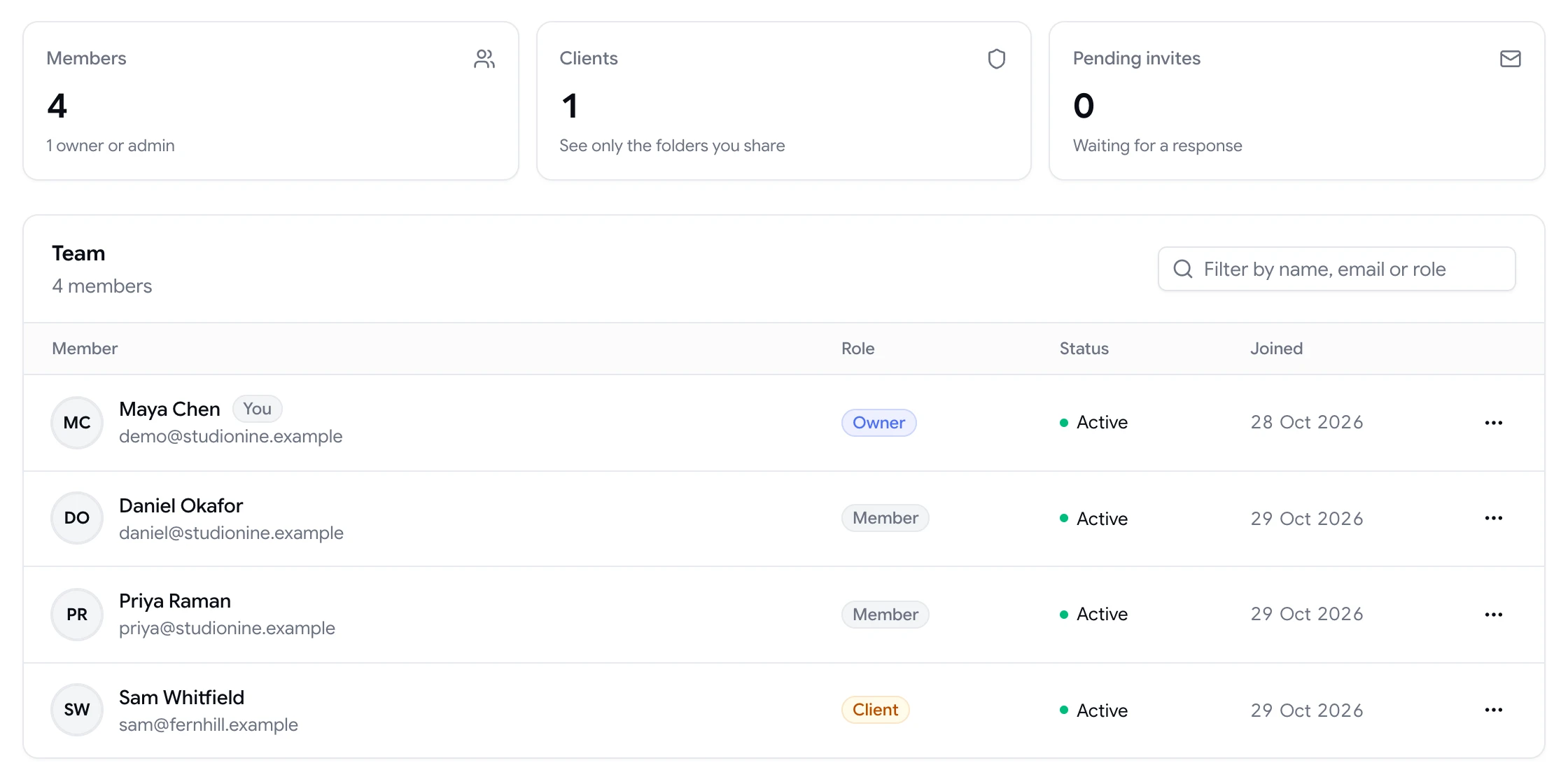
ClientTweak workspaces have owners, admins, members and a client role. Members can resolve, prioritise and assign feedback; guests and clients can comment. Clients only see the folders you share with them, which keeps multi-client agencies tidy.

Share links can be password-protected, turned off or regenerated, and you can invite people by email with a personal message.

  • Owner, admin, member and client roles
  • Password-protected share links
  • Email invites from the Share dialog
Team page showing workspace members and a client with their roles

Fewer review rounds

Pause comments while your team works through feedback, then use Finish review to close the round. Threaded replies, mentions and assignees keep each discussion on its pin instead of in email.

A comment thread with replies, pinned to a button on the page
Switching

Moving from Pastel to ClientTweak

  1. 1

    Start a trial

    Create a ClientTweak workspace and invite your team. Members are unlimited on every plan, so invite everyone who reviews.

  2. 2

    Add your next project

    Paste the live or staging URL, or upload the PDF or image you're reviewing. There's no script to add to the site.

  3. 3

    Connect your task tool

    Link Jira, Asana, ClickUp or Trello from the Integrations page so new comments turn into tasks where your team already works.

  4. 4

    Send the review link

    Share the project link with clients. They click, comment and you get feedback pinned to the exact element. Run both tools side by side until you're sure.

FAQ

ClientTweak vs Pastel: common questions

What is the best Pastel alternative?

If you've outgrown Pastel's canvas or user limits, ClientTweak gives you unlimited projects and members at a flat price. If one active review at a time is enough, Pastel's free plan may be all you need.

Is Pastel free?

Pastel's plans page lists a Free Forever plan for one user and one active canvas. ClientTweak has a free trial but no free plan.

Does ClientTweak limit active projects?

No. Every plan includes unlimited projects, members and guest reviewers.

Do I need an extension to use ClientTweak?

No. Like Pastel, ClientTweak overlays comments on your site through a proxy, so reviewers just open a link.

Can ClientTweak review PDFs and images?

Yes. ClientTweak supports website, PDF and image projects in the same workspace.

Can I export comments from ClientTweak to CSV?

Not currently. ClientTweak sends comments to Jira, Asana, ClickUp or Trello instead.

How much does ClientTweak cost?

$12.99 a month, $89.99 a year, or $249.99 once, with every feature on every plan.

Does ClientTweak have roles for clients?

Yes. The client role limits someone to the folders you share with them and keeps them out of billing and settings.

Can guests resolve comments in ClientTweak?

No. Guests can comment and reply; resolving, prioritising and deleting are for workspace members.

Get started

Try ClientTweak alongside Pastel.

Run your next review round in ClientTweak and compare for yourself. Every plan includes every feature.

  • Unlimited guest reviewers
  • Nothing to install
  • One flat price