
Client feedback

Collect client feedback on the page it's about

Clients know what they want changed; they just can't always describe where. Send them a link, let them click the exact element, and get feedback you can act on without a follow-up call.

  • Clients need no account
  • Feedback pinned to elements
  • Screenshot with every comment
ClientTweak review screen: a client's homepage with numbered comment pins and the comment list beside it
The problem

Client feedback usually arrives in the worst possible format

  • A long email of numbered points that don't say which page they're about.
  • Screenshots from a phone, cropped so you can't tell where they were taken.
  • Feedback split between the client's CEO, marketing lead and assistant.
  • Calls where changes are agreed but never written down.
  • Clients who won't create an account to use your review tool.
Highlights

Easy for clients, clear for your team

ClientTweak keeps the client's side as simple as possible and gives your team the detail it needs.

One link to share

Clients open the review in their browser and comment as guests. No sign-up, no extension.

Click to comment

They click the element they mean. The pin attaches to it, numbered in the comment list.

What they saw

Each comment can save a screenshot of the reviewer's view plus their viewport size.

Conversations on the pin

Reply to clarify; the client is notified and answers in the same thread.

Every stakeholder welcome

Unlimited guest reviewers on every plan, so the whole client team can weigh in.

You stay in control

Only your workspace members can resolve, prioritise or delete comments.

A review link your client will actually use

The fastest way to get good feedback is to remove every obstacle. With ClientTweak you send the client one link. It opens their website inside ClientTweak with a comment layer on top. They click Comment, click the part of the page they want changed, and type.

There's no account to create and nothing to install, which matters more than it sounds: every extra step is a reason to fall back to email.

  • Works in any modern desktop browser
  • Password-protect the link for confidential work
  • Invite specific people by email with a message
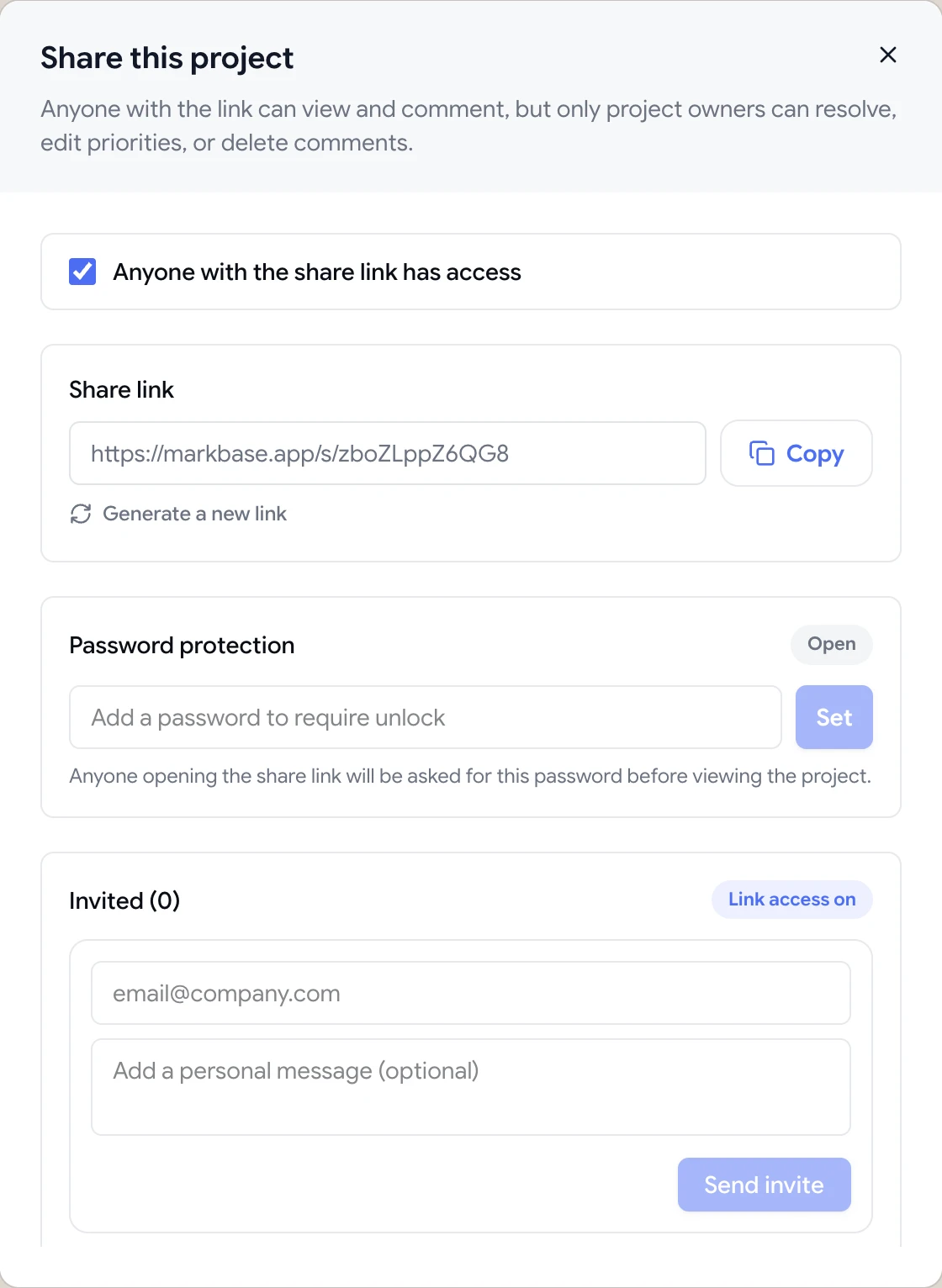
Share dialog with the guest review link, password protection and email invites

Feedback that answers “which one?” before you ask

Each comment is pinned to the element the client clicked and saved with a screenshot of what they were seeing, plus their viewport size and scroll position. When your designer opens the comment, they see the exact button, heading or image, the way the client saw it.

Comments are numbered on the page and listed alongside it, so you can work through them in order and nothing gets skipped.

  • Pinned to the element the client clicked
  • Screenshot of the reviewer's view
  • Viewport size and scroll position

Talk it through without leaving the page

Not every request is clear-cut. Reply to a comment to ask a question or suggest an alternative, and the client gets notified. The decision stays attached to the pin, so anyone picking up the work later can see what was agreed.

When the change is made, resolve the comment. Your client can see what's done, and you have a record of every request in that round.

  • Threaded replies and @mentions
  • Open and resolved status
  • Attach files and Loom videos to comments
A comment thread with replies, pinned to a button on the page

Tips for getting better feedback from clients

The tool removes friction, but a little guidance still goes a long way. When you send the link, tell the client what stage the work is at and what kind of feedback you need: layout and content now, or final polish. Ask them to leave one comment per change rather than a long list in a single pin, so each item can be assigned and resolved on its own.

Give the round a deadline, and let the client know you'll pause comments while you make the changes. That simple rhythm, one round, a pause, the next round, keeps projects moving and stops late requests from derailing a sprint.

Finally, reply to comments as you resolve them. A short “done” or a question in the thread shows the client their feedback was heard, and makes the next round faster.

  • Say what kind of feedback you need
  • One comment per change
  • Set a deadline for each round
  • Reply as you resolve
How it works

How to collect client feedback with ClientTweak

  1. 1

    Add the website

    Paste the live or staging URL into a new project.

  2. 2

    Send the link

    Copy the share link or email it from the Share dialog.

  3. 3

    Client comments

    They click elements and leave pinned comments.

  4. 4

    You work the list

    Reply, fix and resolve until the round is done.

FAQ

Frequently asked questions

What's the best way to collect website feedback from clients?

Let them comment directly on the website, on the element they mean, without signing up for anything. A visual feedback tool like ClientTweak does this with a guest review link.

Do clients need to create an account?

No. Clients comment as guests from the share link. You can also add long-term clients to your workspace with a client role.

Do clients need to install anything?

No. The review opens in a normal browser tab. Nothing is installed on their computer or your website.

Can clients resolve or delete comments?

No. Guests can comment and reply. Only your workspace members can resolve, change priority or delete comments.

Can I collect feedback on PDFs and images too?

Yes. Create a PDF or image project and share it the same way.

How many clients can review a project?

As many as you like. Every plan includes unlimited guest reviewers.

Can clients attach files or videos to their feedback?

Yes. Comments support file attachments, and with the Loom integration connected, Loom recordings can be embedded in comments.

Get started

Send your client one link.

They click and comment. You get feedback pinned to the exact element.

  • Unlimited guest reviewers
  • Nothing to install
  • One flat price
