For marketing teams

Get campaign pages approved without the email chain

Campaign deadlines don't move, but approvals do. ClientTweak lets your copywriters, designers, legal and leadership review the live landing page in one place, with every comment pinned to the words or image it's about.

  • Review live landing pages
  • Approvers need no account
  • Check mobile layouts
ClientTweak review screen: a client's homepage with numbered comment pins and the comment list beside it
The problem

Campaign reviews break down in the last 48 hours

  • Copy changes arrive as a Word doc that doesn't match what's on the page.
  • Legal, brand and leadership all review separately and contradict each other.
  • Nobody checked the mobile version until the campaign was live.
  • The web team gets a screenshot and has to guess which headline changed.
  • You can't tell if the latest version has been approved.
Highlights

Built for fast-moving campaigns

Review the page people will actually see, with everyone involved.

Copy feedback in context

Pin a comment to the exact headline or paragraph you want to change, on the live page.

Mobile checked

Switch to the phone preview and review the layout most of your traffic will see.

Unlimited approvers

Legal, brand and leadership comment from a link, with no accounts or seats to manage.

PDFs and images too

Review one-pagers, brochures and social graphics in the same workspace.

Private until launch

Password-protect review links for unannounced campaigns.

Clear status

Open and resolved comments show exactly what's still waiting before you publish.

Edit the page, not a copy deck

Copy reviewed in a document reads differently on the page. With ClientTweak, reviewers read the real landing page with its real layout, and pin comments to the exact sentence, button label or image they want changed.

Your web team sees the comment on the element it's about, with a screenshot of what the reviewer saw. No guessing which headline was meant.

  • Comments pinned to text, buttons and images
  • Screenshot of what the reviewer saw
  • Replies in the same thread

Check the version most people will see

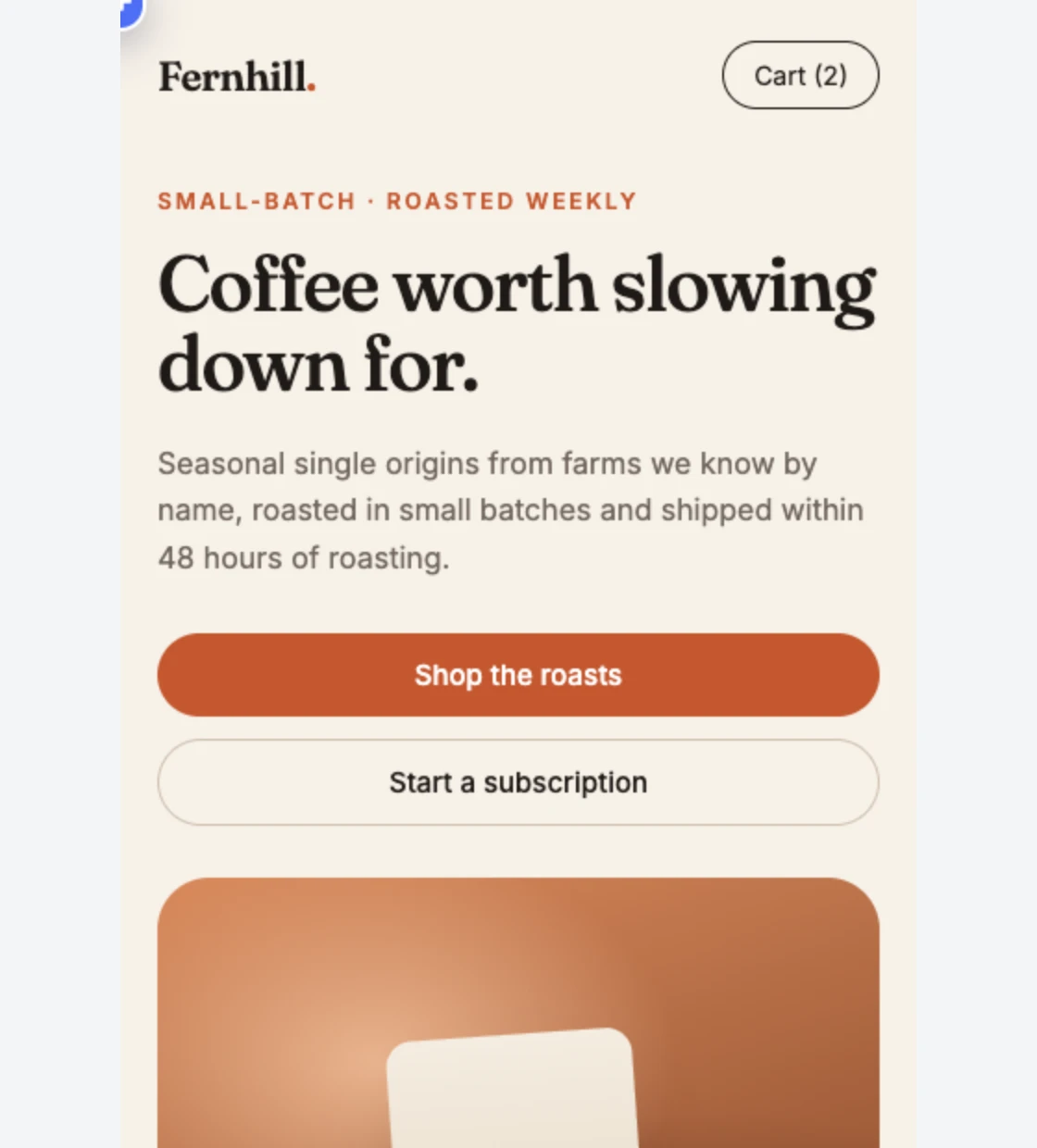
Most campaign traffic arrives on a phone. Switch the review to phone width and check the hero, the form and the call to action before launch. Comments left at phone width stay scoped to that layout.

Phone-width preview of a website inside ClientTweak

Sign-off from everyone, in one link

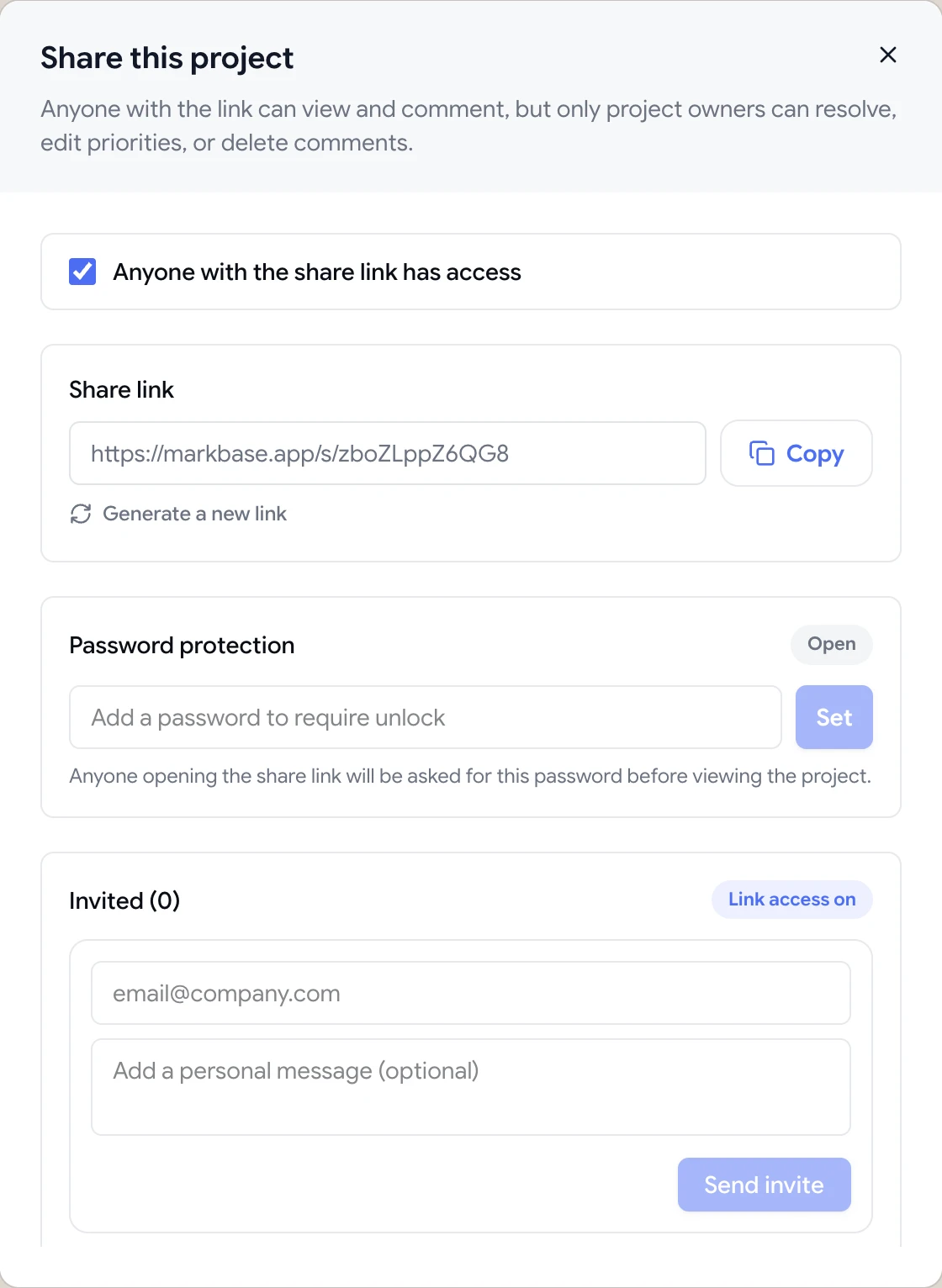
Send the share link to every approver. They comment as guests, and you can password-protect the link until the campaign is announced. When they're done, finish the review and keep a record of what was raised and resolved.

  • Unlimited guest reviewers
  • Password-protected links
  • Invite approvers by email
Share dialog with the guest review link, password protection and email invites

Ship campaigns on schedule

Campaign launches have fixed dates, so the review stage is where schedules slip. The usual culprits are slow approvals, contradictory feedback and late surprises on mobile. A single review link fixes most of that: every approver sees the same page, every comment is visible to everyone else, and the mobile layout is reviewed alongside desktop instead of after launch.

Set a deadline when you share the link, prioritise anything that blocks launch, and assign each comment to the person making the change. On launch day, the Active tab tells you exactly what's still open.

For campaign assets beyond the landing page, create PDF and image projects in the same folder, so the brochure, the social graphics and the page are reviewed together.

  • One link for every approver
  • Launch blockers flagged high
  • Page, PDFs and images in one folder
How it works

A campaign review in ClientTweak

  1. 1

    Add the landing page

    Paste the staging or preview URL.

  2. 2

    Share with approvers

    Send the link to brand, legal and leadership.

  3. 3

    Fix and reply

    Your web team works through pinned comments.

  4. 4

    Approve and publish

    Resolve everything, finish the review, go live.

FAQ

Frequently asked questions

How do I get feedback on a landing page before launch?

Share the page's staging URL in ClientTweak and send reviewers the link. They pin comments directly on the page, and you work through them before publishing.

Can non-technical reviewers use it?

Yes. They open a link, click what they want changed and type. There's no account or extension to set up.

Can we review copy changes?

Yes. Pin a comment to any heading, paragraph or button label and suggest the new wording in the comment.

Can we review mobile layouts?

Yes. Switch the preview to tablet or phone width and comment on that layout.

Can we keep unreleased campaigns private?

Yes. Password-protect the share link, and turn it off or regenerate it when the review is over.

Does it work with our CMS?

ClientTweak works with any page it can load by URL, whatever it was built with. Nothing is installed in your CMS.

Can we review social graphics and banners?

Yes. Upload them as image projects (PNG, JPEG, WebP or GIF) and collect pinned comments the same way you do on a page.

How do we avoid contradictory feedback from approvers?

Have everyone review the same link. Comments on the same element appear together, so conflicting requests are visible straight away and can be settled in one thread.

Can we review emails or ads?

If you can export them as an image or PDF, upload them as an image or PDF project and collect pinned comments.

Get started

Start your next review today.

Pin feedback on live websites, PDFs and images, and turn it into work your team can track.

  • Unlimited guest reviewers
  • Nothing to install
  • One flat price