Comment workflow

Turn feedback into a to-do list your team can finish

Every pin is a conversation and a task. Reply in a thread, mention a teammate, assign it, set a priority and resolve it when it's done.

  • Threads and @mentions
  • Assignees and priority
  • Open and resolved
A comment thread with replies, pinned to a button on the page
The problem

Collecting feedback is easy. Getting through it is the hard part.

  • Forty comments arrive and nobody knows who's handling which.
  • Urgent fixes sit next to “nice to have” ideas with no way to tell them apart.
  • Questions about a comment happen in Slack, away from the comment.
  • The client asks what's been done and nobody has a clear answer.
Highlights

Everything you need to work through feedback

Collaboration happens on the pin, so context never gets separated from the conversation.

Threaded replies

Ask a follow-up question or confirm a fix right under the original comment.

@mentions

Mention a teammate to pull them into a thread. They're notified in ClientTweak and by email.

Assignees

Assign each comment to the person responsible, so ownership is never in doubt.

Priority

Mark comments as low, medium or high priority and tackle the important ones first.

Open and resolved

Resolve comments when they're done. Active and Resolved tabs show what's left at a glance.

Search, filter and sort

Find a comment by text, filter the list, and sort it the way you want to work through it.

Conversations that stay on the pin

Good feedback often needs a follow-up: “do you mean the heading or the subheading?”, “like this?”, “fixed — can you check?”. In ClientTweak that conversation happens in a thread under the comment, attached to the same pin and screenshot.

Use @mentions to bring in the person who needs to answer. Add emoji, attach files or embed a Loom recording when a quick video explains it better. Everything about that piece of feedback stays in one place.

  • Threaded replies under every comment
  • @mention workspace members
  • Attachments, emoji and Loom recordings in replies

ClientTweak review screen: a client's homepage with numbered comment pins and the comment list beside it

Ownership, priority and status

A review becomes manageable once every comment has an owner and a priority. Assign comments to teammates directly from the comment, and mark them low, medium or high so the urgent fixes rise to the top.

When a change is made, resolve the comment. The Active and Resolved tabs give you an instant count of what's left, and the resolved list doubles as a record of what changed for the client. Only workspace members can resolve, prioritise or delete comments — guests can comment and reply, but the workflow stays with your team.

  • Assign comments to teammates
  • Low, medium and high priority
  • Active and Resolved tabs with counts
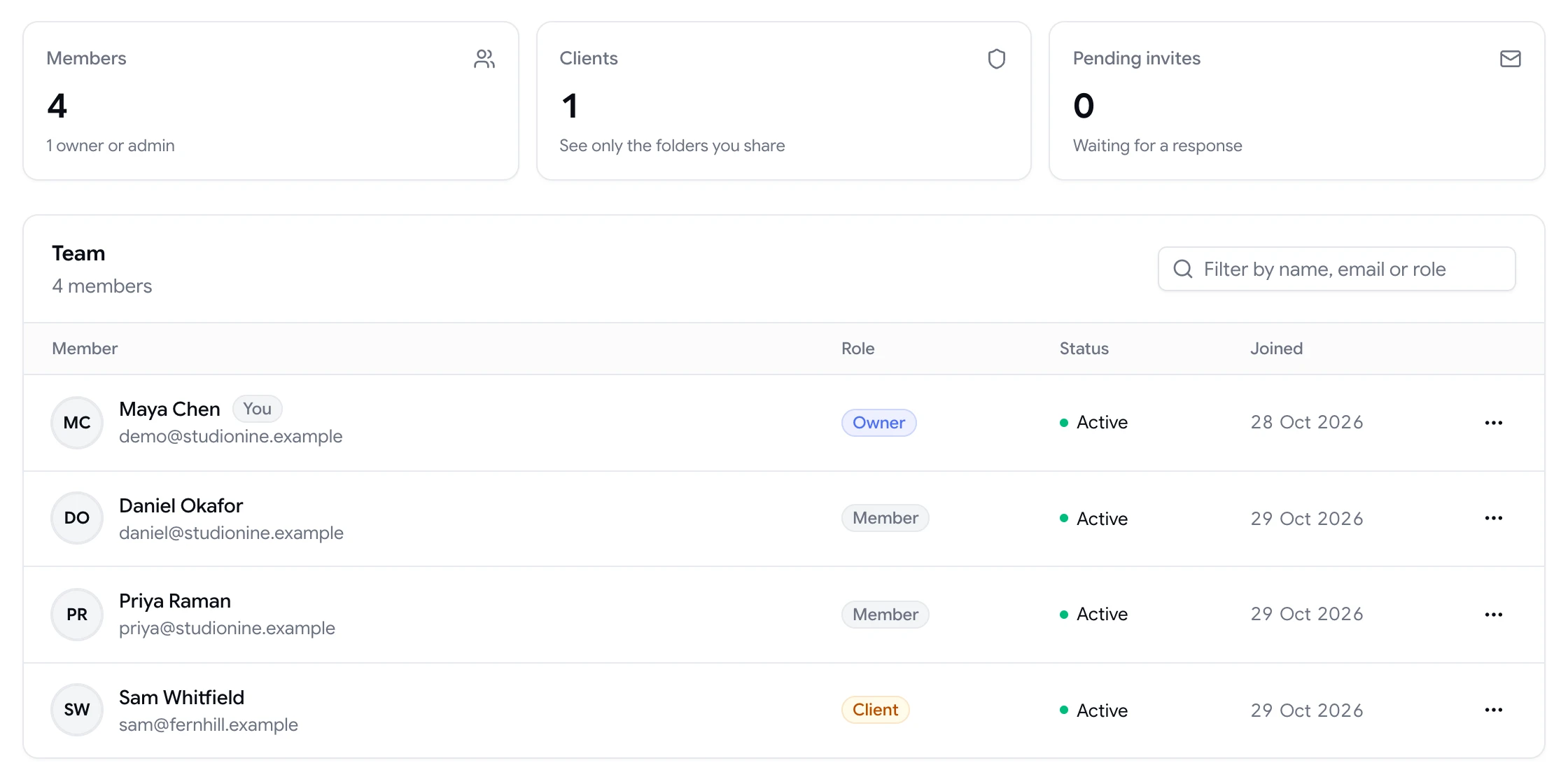
  • Resolving is limited to workspace members
Team page showing workspace members and a client with their roles

Notifications without the noise

ClientTweak notifies people when something needs them: when they're mentioned, assigned a comment, get a reply or see a comment resolved. In-app notifications appear under the bell, and each type can be switched on or off per person.

Email notifications let you know when new comments arrive on your projects, when you're mentioned and when a reviewer finishes a review. Turn email off in your settings if you'd rather check the app.

  • In-app notifications for mentions, assignments, replies and resolutions
  • Email for new comments, mentions and finished reviews
  • Per-person notification settings

Send the work where your team plans

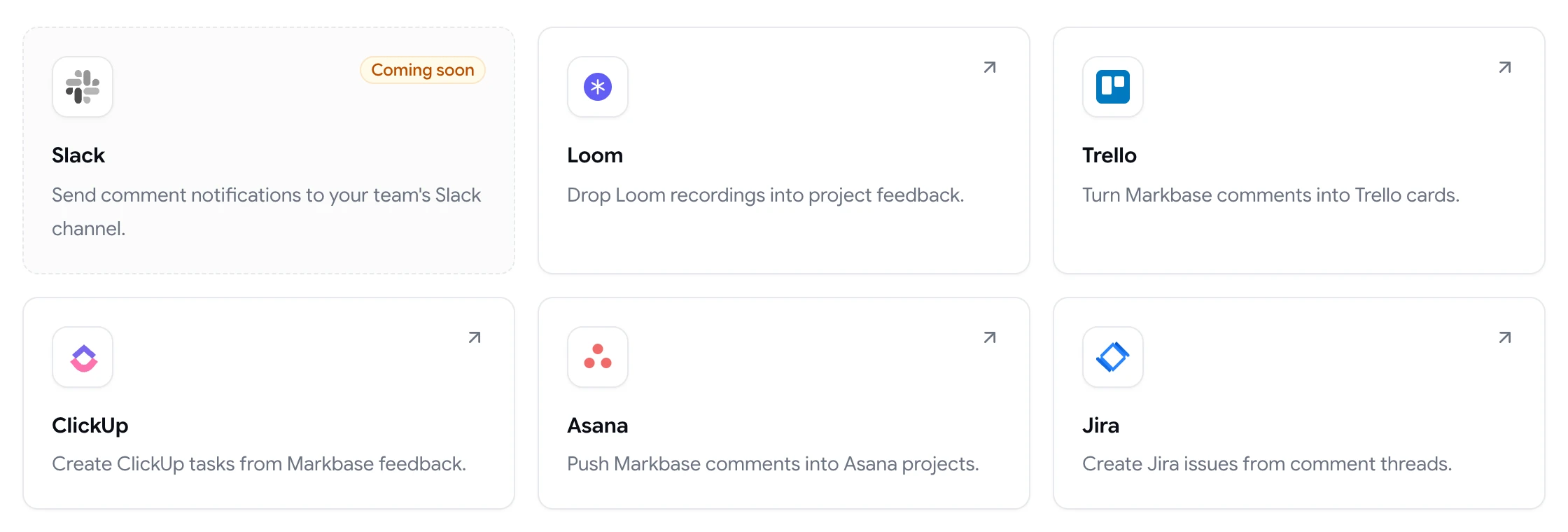
If your team runs on a task tracker, connect it. ClientTweak can create Jira issues, Asana tasks, ClickUp tasks or Trello cards when comments are created, resolved or deleted, with the comment text, author, priority, status, page and a link back to the pin.

  • Jira, Asana, ClickUp and Trello integrations
  • New, resolved and deleted comments are all sent
  • Every task links back to the original comment
ClientTweak integrations page listing Loom, Trello, ClickUp, Asana and Jira, with Slack coming soon
How it works

Work through a review round

  1. 1

    Triage

    Read new comments and set a priority on each one.

  2. 2

    Assign

    Give every comment an owner on your team.

  3. 3

    Discuss

    Ask follow-ups in the thread and @mention who needs to answer.

  4. 4

    Resolve

    Mark comments resolved as each change goes live.

FAQ

Frequently asked questions

Can I assign website feedback to a teammate?

Yes. Any comment can be assigned to a member of your workspace. They're notified, and the comment shows who's responsible for it.

How do I prioritise feedback?

Set each comment's priority to low, medium or high. You can filter and sort the comment list to work through the most important feedback first.

Can clients resolve comments?

No. Guests and clients can comment and reply, but resolving, changing priority and deleting comments are limited to members of your workspace.

Will I get an email when someone comments?

Yes, if email notifications are switched on. ClientTweak emails you about new comments on your projects, when you're mentioned, and when a reviewer finishes a review. You can turn email off in your settings.

Can I @mention people in comments?

Yes. Type @ to mention a member of your workspace. They get an in-app notification and an email.

Can feedback go into Jira or Asana automatically?

Yes. Connect Jira, Asana, ClickUp or Trello and each new comment creates an issue, task or card. Resolved and deleted comments are sent too.

Get started

Get from forty comments to zero.

Threads, owners, priorities and a clear resolved list — all on the page the feedback is about.

  • Unlimited guest reviewers
  • Nothing to install
  • One flat price